Skip to content
EduHubAdda

AP SBTET Results 2026 at sbtet.ap.gov.in: Check AP SBTET C23 Results
Priyanka PatelResults

AP SBTET Results 2026 – Check C23 Results Online

Check AP SBTET C23 Results 2026 online at sbtet.ap.gov.in using your PIN, examination month/year and semester. Learn how to view and save your result.

The AP SBTET Results 2026 at sbtet.ap.gov.in are an important update for students pursuing diploma courses under the State Board of Technical Education and Training (SBTET), Andhra Pradesh. Students who appeared for the Diploma C23 examinations can check their results online through the official SBTET AP website.
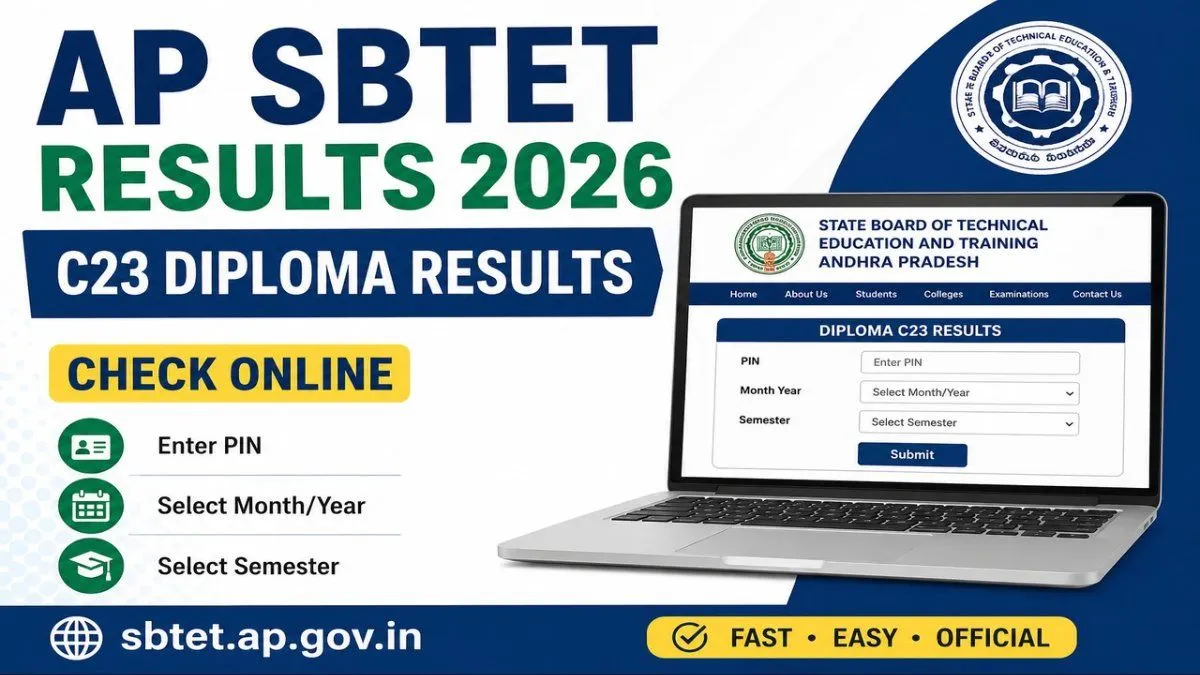
The official SBTET portal provides a dedicated “Diploma C23 Results” page where students can enter their PIN, month/year and semester to access their result.
Students should keep their Permanent Identification Number (PIN) ready before checking the result. After submitting the required details, the result can be viewed online and the student can check the marks and qualifying status for the respective examination.
This article explains how to check AP SBTET C23 Results 2026, the details required to access the result, how to download or save the result, what to do if the result is not displayed and other important information for diploma students.


AP SBTET Results 2026 – Overview

Particular
Details
Board
State Board of Technical Education and Training, Andhra Pradesh
Popular Name
AP SBTET
Examination
Diploma Examination
Curriculum
C23
Result
AP SBTET C23 Results 2026
Result Mode
Online
Official Website
sbtet.ap.gov.in
Result Page
Diploma C23 Results
Credentials Required
PIN, Month/Year and Semester
Result Format
Online result/marks details
The official result page is specifically titled “Diploma C23 Results” and asks candidates to provide their PIN, month year and semester before submitting the request.


What Are AP SBTET C23 Results 2026?

The AP SBTET C23 Results 2026 are the examination results for students studying diploma programmes under the C23 curriculum of the Andhra Pradesh State Board of Technical Education and Training.
SBTET conducts diploma examinations for students enrolled in various technical and non-engineering diploma programmes across Andhra Pradesh. After the examinations are evaluated, students can access their results through the official online result system.
The online result allows students to check the outcome of the examination for the selected semester and examination session.
Students should remember that the online result is primarily useful for checking their examination performance. If the board later provides an official marks memo or other academic document, students should preserve that document as well.


Where to Check AP SBTET Results 2026?

Students should check their results through the official AP SBTET website.
The official result page is available at:
The official page is titled “Diploma C23 Results.” It provides fields for the student's PIN, month/year and semester.
Students should avoid entering their personal information on unofficial result websites. Third-party websites may publish result updates, but the official SBTET portal should be preferred for actually checking the result.


How to Check AP SBTET C23 Results 2026 Online

Students can follow the steps below to check their AP SBTET Results 2026.

Step 1: Visit the Official Website

Open the AP SBTET website using a browser.
Go to:

Step 2: Open the C23 Result Page

Navigate to the result section and select the link for Diploma C23 Results.
The official result page specifically identifies the result as “Diploma C23 Results.”

Step 3: Enter Your PIN

Enter your PIN in the required field.
The PIN is the identification number associated with your diploma examination record.
Make sure you enter the number correctly before proceeding.

Step 4: Select the Month and Year

The official result page asks students to select the relevant month year for the examination.
Select the examination session for which you want to check your result.

Step 5: Select Your Semester

Choose the appropriate semester from the available options.
Make sure you select the same semester for which you appeared in the examination.

Step 6: Submit the Details

After entering the required information, submit the form.
The system will process the information and display the result if the entered details match the board's records.

Step 7: Check Your Result

Once the result is displayed, carefully check the information shown on the screen.
Students should verify their marks and examination details before leaving the page.

Step 8: Save the Result

Download or save a copy of the result for future reference.
You can also take a printout if required.


Details Required to Check AP SBTET C23 Results

The official AP SBTET C23 result page requires three main pieces of information:
PIN
Month and year
Semester
These fields are displayed directly on the official result page. ([SBTET Andhra Pradesh][1])
Students should keep these details ready before attempting to check their results.
If you enter an incorrect PIN or select the wrong examination session or semester, the result may not be displayed correctly.


AP SBTET C23 Result 2026 – What Should Students Check?

After opening the result, students should carefully review all available information.
Depending on the result format provided by SBTET, students should look for details such as:
Student identification details
PIN
Course or programme information
Semester
Examination session
Subject-wise marks
Total marks
Result status
Pass/fail information
The exact information displayed can depend on the result format provided by the board for the particular examination.
Students should compare the result with their examination records and make sure that the PIN and semester correspond to their own academic details.


How to Save AP SBTET Results 2026

Once the result is displayed, students should save a copy for future use.
You can use the browser's print or save function to keep a digital copy.

To save the result as a PDF:

  1. Open the result.
  1. Select the browser's Print option.
  1. Choose Save as PDF if available.
  1. Select the destination folder.
  1. Save the file with an identifiable name.
For example, a student can save the file as:
AP-SBTET-C23-Result-2026.pdf
Keeping a digital copy can be useful when applying for further education, internships or other opportunities that require academic information.


AP SBTET Results 2026 Not Showing – What to Do?

Sometimes students may enter their details but fail to see the result.
This does not necessarily mean that the student has failed or that the result has been cancelled.
There can be several reasons for a result not appearing.

1. Check Your PIN

Make sure the PIN has been entered correctly.
A single incorrect number can prevent the system from locating your result.

2. Check the Month and Year

The official result page requires students to select the examination month and year. ([SBTET Andhra Pradesh][1])
Make sure you select the correct examination session.

3. Check the Semester

Select the semester corresponding to the examination you appeared for.

4. Try Again

Temporary website traffic or technical issues can sometimes prevent a result page from responding correctly.
Close the page and try again after some time.

5. Check the Official Website

Make sure you are using the official SBTET website rather than an unofficial result page.

6. Contact the Board or Institution

If your result is still unavailable despite entering the correct details, contact your college or the appropriate SBTET authority for assistance.


AP SBTET C23 Results 2026 – What If There Is a Mistake?

Students should carefully inspect the result after it appears.
If you believe there is an error in your marks, personal details or result status, do not attempt to alter the online result yourself.
Instead, follow the official procedure provided by SBTET or contact your college for guidance.
The process for recounting, verification or other result-related requests can depend on the specific examination notification and rules applicable to that examination.
Students should therefore rely on the official instructions issued for their examination rather than submitting a request based on information from an unrelated website.


AP SBTET C23 Results and Marks Memo

The online result is useful for checking examination performance, but students should distinguish between an online result and an official academic document.
After checking the result, students should keep track of any marks memo, provisional certificate or other document issued by SBTET or their institution.
If a college or university asks for proof of diploma marks, students should provide the document specifically requested by that institution.
The online result can be saved as a reference while waiting for or obtaining the appropriate official document.


AP SBTET Diploma Results 2026

The AP SBTET result system is designed to provide diploma students with online access to examination results.
The C23 result page is specifically labelled “Diploma C23 Results.”
Students enrolled in C23 programmes should therefore select the appropriate result option and provide the required examination information.
It is particularly important for students to select the correct semester because diploma programmes can have multiple semester examinations and result sessions.


Why Is the AP SBTET PIN Important?

The PIN is an important identification detail for diploma students.
The official C23 result page uses the PIN as one of the required fields for retrieving the result.
Students should keep their PIN safely stored throughout their diploma course.
If you frequently need to access examination results, having your PIN readily available can make the process faster.
Avoid sharing your PIN unnecessarily on public platforms or social media.


AP SBTET C23 Results 2026 – Important Tips

Students checking their results should keep the following points in mind:
  1. Use the official SBTET website.
  1. Keep your PIN ready.
  1. Select the correct examination month and year.
  1. Select the correct semester.
  1. Check the result carefully after it appears.
  1. Save a digital copy.
  1. Take a printout if necessary.
  1. Keep the result safely for future reference.
  1. Contact your college if there is a discrepancy.
  1. Follow official SBTET instructions for any result-related grievance.
These simple steps can help students avoid common problems while checking their diploma results.


What After AP SBTET C23 Results 2026?

Once the result has been released, students should determine their next academic step.

If You Passed

Students who successfully completed their semester can continue to the next stage of their diploma programme, subject to the applicable academic rules.

If You Have a Backlog

If you did not clear one or more subjects, check the official SBTET information regarding supplementary or subsequent examinations.
Do not rely on social-media posts for examination dates. Wait for the official notification.

If You Need the Marks Memo

Keep track of the official process for obtaining the marks memo or other academic documents through your institution or SBTET.

If You Plan Further Studies

Diploma students may use their academic records when applying for further education, depending on the eligibility requirements of the institution and course they choose.


AP SBTET C23 Results 2026 – Frequently Asked Questions

Where can I check AP SBTET C23 Results 2026?

You can check the result through the official AP SBTET website. The board has a dedicated Diploma C23 Results page.

What details are required to check AP SBTET C23 Results?

The official result page requires your PIN, month/year and semester.

What is the official website of AP SBTET?

The official website is sbtet.ap.gov.in.

How do I check my AP SBTET result online?

Visit the official SBTET website, open the Diploma C23 Results page, enter your PIN, select the examination month/year and semester, and submit the details.

What is the AP SBTET C23 result?

It is the examination result for diploma students studying under the C23 curriculum of the Andhra Pradesh State Board of Technical Education and Training.

What should I do if my result is not showing?

First verify your PIN, examination month/year and semester. If the problem continues, try again later or contact your college/SBTET through the appropriate official channel.

Can I save my AP SBTET result?

Yes. Once the result appears, you can save or print the page for future reference.

Is the online result the same as the original marks memo?

The online result is useful for checking your examination outcome. Students should obtain and preserve the official marks memo or other academic document issued through the prescribed process when required.

Can I check a different semester's result?

The official C23 result page provides a semester selection field, allowing students to select the relevant semester when checking their result.

What is required if I forget my PIN?

Students should check their college records, examination documents or other official records where their PIN is provided. If they cannot recover it, they should contact their college or the appropriate SBTET authority.


Final Words

The AP SBTET Results 2026 at sbtet.ap.gov.in are important for diploma students waiting to check their C23 examination performance. The official SBTET website provides a dedicated Diploma C23 Results page through which students can retrieve their results online.
To check the AP SBTET C23 Results 2026, students need to provide their PIN, examination month/year and semester. After submitting these details, they can view the available result information and save a copy for future reference.
Students should always use the official sbtet.ap.gov.in website when checking their results and should avoid entering personal or examination details on unverified third-party websites.
If the result does not appear, check the PIN, examination session and semester first. If the issue continues, students should wait and try again or contact their college/SBTET through the appropriate official channel.
Most importantly, students should preserve their result and later obtain the required official marks memo or academic document for admissions, further studies and other purposes.

Frequently asked questions

  • What Are AP SBTET C23 Results 2026?

    The **AP SBTET C23 Results 2026** are the examination results for students studying diploma programmes under the C23 curriculum of the Andhra Pradesh State Board of Technical Education and Training. SBTET conducts diploma examinations for students enrolled in various technical and non-engineering diploma programmes across Andhra Pradesh. After the examinations are evaluated, students can access their results through the official online result system. The online result allows students to check the outcome of the examination for the selected semester and examination session. Students should remember that the online result is primarily useful for checking their examination performance. If the board later provides an official marks memo or other academic document, students should preserve that document as well. ---

  • Where to Check AP SBTET Results 2026?

    Students should check their results through the **official AP SBTET website**. The official result page is available at: [AP SBTET C23 Results – Official Result Page](https://sbtet.ap.gov.in/APSBTET/gradeWiseResults.do?utm_source=chatgpt.com) The official page is titled **“Diploma C23 Results.”** It provides fields for the student's **PIN, month/year and semester**. Students should avoid entering their personal information on unofficial result websites. Third-party websites may publish result updates, but the official SBTET portal should be preferred for actually checking the result. ---

  • AP SBTET C23 Result 2026 – What Should Students Check?

    After opening the result, students should carefully review all available information. Depending on the result format provided by SBTET, students should look for details such as: * Student identification details * PIN * Course or programme information * Semester * Examination session * Subject-wise marks * Total marks * Result status * Pass/fail information The exact information displayed can depend on the result format provided by the board for the particular examination. Students should compare the result with their examination records and make sure that the PIN and semester correspond to their own academic details. ---

  • AP SBTET Results 2026 Not Showing – What to Do?

    Sometimes students may enter their details but fail to see the result. This does not necessarily mean that the student has failed or that the result has been cancelled. There can be several reasons for a result not appearing.

  • AP SBTET C23 Results 2026 – What If There Is a Mistake?

    Students should carefully inspect the result after it appears. If you believe there is an error in your marks, personal details or result status, do not attempt to alter the online result yourself. Instead, follow the official procedure provided by SBTET or contact your college for guidance. The process for recounting, verification or other result-related requests can depend on the specific examination notification and rules applicable to that examination. Students should therefore rely on the official instructions issued for their examination rather than submitting a request based on information from an unrelated website. ---

  • Why Is the AP SBTET PIN Important?

    The **PIN** is an important identification detail for diploma students. The official C23 result page uses the PIN as one of the required fields for retrieving the result. Students should keep their PIN safely stored throughout their diploma course. If you frequently need to access examination results, having your PIN readily available can make the process faster. Avoid sharing your PIN unnecessarily on public platforms or social media. ---

  • What After AP SBTET C23 Results 2026?

    Once the result has been released, students should determine their next academic step.

  • Where can I check AP SBTET C23 Results 2026?

    You can check the result through the official AP SBTET website. The board has a dedicated **Diploma C23 Results** page.

  • What details are required to check AP SBTET C23 Results?

    The official result page requires your **PIN, month/year and semester**.

  • What is the official website of AP SBTET?

    The official website is **sbtet.ap.gov.in**.

  • How do I check my AP SBTET result online?

    Visit the official SBTET website, open the Diploma C23 Results page, enter your PIN, select the examination month/year and semester, and submit the details.

  • What is the AP SBTET C23 result?

    It is the examination result for diploma students studying under the **C23 curriculum** of the Andhra Pradesh State Board of Technical Education and Training.

  • What should I do if my result is not showing?

    First verify your PIN, examination month/year and semester. If the problem continues, try again later or contact your college/SBTET through the appropriate official channel.

  • Can I save my AP SBTET result?

    Yes. Once the result appears, you can save or print the page for future reference.

  • Is the online result the same as the original marks memo?

    The online result is useful for checking your examination outcome. Students should obtain and preserve the official marks memo or other academic document issued through the prescribed process when required.

  • Can I check a different semester's result?

    The official C23 result page provides a **semester selection** field, allowing students to select the relevant semester when checking their result.

  • What is required if I forget my PIN?

    Students should check their college records, examination documents or other official records where their PIN is provided. If they cannot recover it, they should contact their college or the appropriate SBTET authority. ---

Comments

The thread is quiet
If something in the piece stuck with you, leave the first note below.

Join the conversation

A short response is enough. We’ll review it before it appears on the site.
Kept for moderation. Email stays private.