Skip to content
EduHubAdda

DCD Admit Card Download 2026 – Teletalk Admit Card & Exam Date
Kanjari BhattacharyyaAdmit Card

DCD Admit Card Download 2026 – Teletalk Admit Card

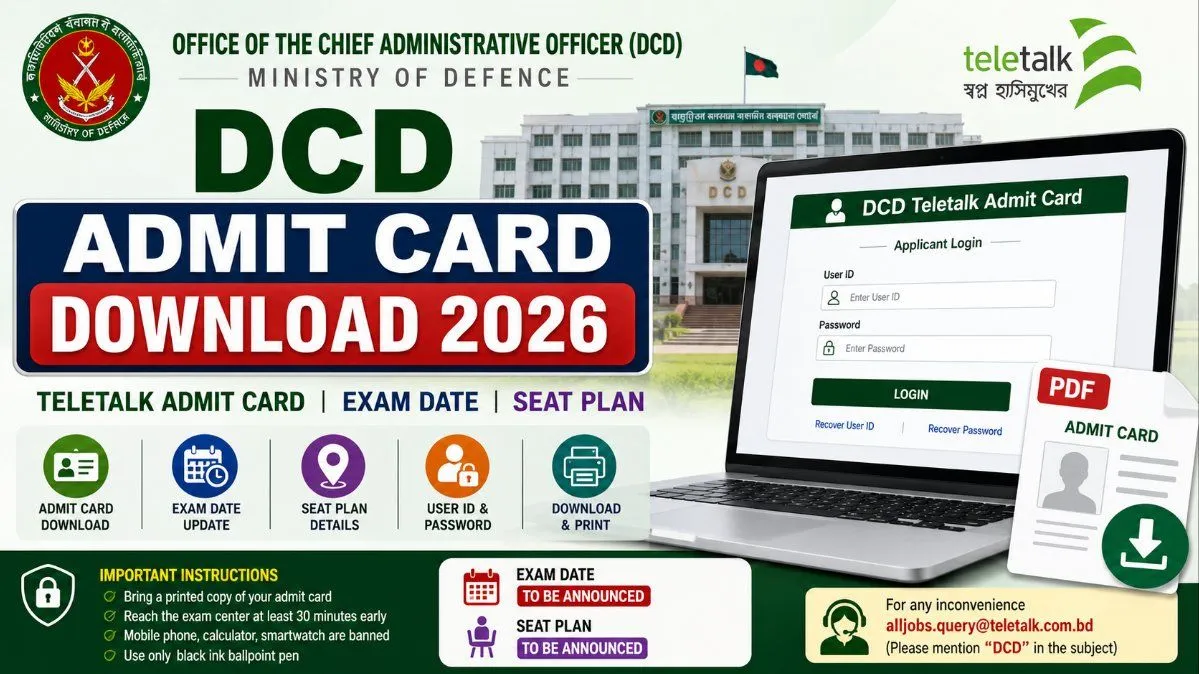
Check DCD Admit Card Download 2026 updates, including the release status, Teletalk download process, User ID and Password login, exam date, seat plan and exam-day instructions.

The DCD Admit Card Download 2026 is an important update for candidates who applied for the recruitment of the Office of the Chief Administrative Officer (DCD), Ministry of Defence. Applicants who successfully completed the application process should download their admit card from the official DCD Teletalk recruitment system once it is released.
The DCD 2026 recruitment circular was issued on 11 June 2026 under circular reference 23.17.0000.001.07.051.26.730. The official Teletalk recruitment portal confirms that the application period is now over.

DCD Admit Card 2026 Latest Status

As of the latest official update, the DCD Admit Card 2026 has not yet been published on the dedicated 2026 DCD Teletalk admit-card page. Candidates should therefore wait for the official release rather than relying on unofficial claims that the hall ticket is already available.
Once DCD activates the admit-card facility, candidates should be able to access the document through the official Teletalk system using their application credentials.
This article explains the expected download process, current status, exam-date updates, seat-plan information, login recovery and important instructions so applicants are prepared when the admit card becomes available.

DCD Admit Card 2026 – Overview

Particular
Details
Organization
Office of the Chief Administrative Officer
Abbreviation
DCD
Ministry
Ministry of Defence
Recruitment Year
2026
Circular Date
11 June 2026
Application Status
Closed
Admit Card Status
Not Published Yet
Admit Card Mode
Online
Download Portal
DCD Teletalk
Login Method
User ID & Password
Exam Date
To Be Announced
Seat Plan
To Be Announced
Official Website
Recruitment Portal
The official DCD Teletalk portal identifies the recruiting authority as the Office of the Chief Administrative Officer, Ministry of Defence, with its office at 198, Dhaka Cantonment, Dhaka-1206.

DCD Admit Card 2026 Release Status

Candidates searching for the DCD Admit Card Download 2026 should first check whether the admit card has officially been released.
At present, the official DCD 2026 admit-card page displays the message:
“Admit Card has not been published yet!”
Therefore, candidates should not enter their credentials on unofficial websites claiming to provide the DCD 2026 admit card. The safest option is to use the official DCD Teletalk system.
The recruitment application process has already closed, and the official DCD Teletalk portal lists the 11 June 2026 circular as the current recruitment circular.

When Will DCD Admit Card 2026 Be Released?

The official DCD 2026 admit-card page has not provided a specific release date yet.
Candidates should therefore avoid assuming a particular date until DCD publishes an official notice.
The admit-card release may be followed by information about:
Written examination date
Examination time
Examination centre
Reporting time
Seat plan
Examination instructions
Candidates should regularly check the official DCD Teletalk portal and DCD website for these updates.

How to Download DCD Admit Card 2026

Once the DCD Admit Card 2026 is officially released, candidates can follow these steps.

Step 1: Visit the DCD Teletalk Portal

Open the official DCD recruitment website:
dcd.teletalk.com.bd
Use the official recruitment system rather than third-party download pages.

Step 2: Open the Admit Card Section

Select the Admit Card option or open the dedicated DCD 2026 admit-card page.
The official page is already active, but the 2026 system currently states that the admit card has not been published.

Step 3: Enter Your User ID

Enter the User ID associated with your DCD application.
Candidates should use the same credentials generated during the recruitment application process.

Step 4: Enter Your Password

Enter the password associated with your application.
Check the spelling and numbers carefully before submitting.

Step 5: Log In

Click the Login or submit button.
If the admit card has been released and your application is eligible, the system should display the available examination document.

Step 6: Download the Admit Card

Open the admit card and download the file.
Save a copy on your phone or computer so that you can access it again if necessary.

Step 7: Print the Admit Card

Print a clear copy of the admit card on suitable paper.
Candidates should keep the printed admit card safely because it may be required to enter the examination centre.

DCD Admit Card Download – Quick Guide

Step
What to Do
1
Visit dcd.teletalk.com.bd
2
Open the Admit Card section
3
Enter User ID
4
Enter Password
5
Click Login
6
View the admit card
7
Download the PDF/document
8
Save a backup copy
9
Print the admit card
10
Check exam centre and instructions
This process should be followed after the official DCD 2026 admit-card facility becomes available.

What Information Will Be on the DCD Admit Card?

After downloading the hall ticket, candidates should carefully check all details.
The admit card may contain important information such as:
Candidate name
Roll number
Post name
Photograph
Signature
Examination name
Examination date
Examination time
Reporting time
Examination centre
Venue address
Examination instructions
Candidates should compare the information with their application details.
If an important error is found, candidates should contact the appropriate recruitment authority rather than changing the admit card themselves.

DCD Exam Date 2026

The DCD Exam Date 2026 has not yet been announced on the official 2026 admit-card page.
Candidates should therefore avoid relying on unofficial examination dates.
The official examination date should be checked through the DCD recruitment portal or an official DCD notice once it is published.
Candidates should look for information about:
Written examination date
Examination shift
Reporting time
Examination duration
Examination centre
Seat plan

DCD Seat Plan 2026

The DCD Seat Plan 2026 should be checked after the examination schedule and centre information are officially published.
A seat plan may provide details about:
Candidate roll numbers
Examination centres
Venue names
Room numbers
Candidate distribution
Reporting arrangements
Candidates should check the seat plan using their roll number once DCD publishes it.
Do not assume that every applicant will receive the same examination centre.

DCD Recruitment 2026 – Important Dates

Event
Date / Status
Recruitment Circular
11 June 2026
Application Start
As stated in official circular
Application Deadline
Application period closed
Admit Card
Not Published Yet
Written Exam Date
To Be Announced
Seat Plan
To Be Announced
Exam Result
To Be Announced
The official Teletalk portal confirms the current 2026 circular reference and that the online application period is now over.

DCD Applicant Login 2026

Candidates should keep their application credentials safe because they may be required for several recruitment-related services.
The DCD Teletalk system provides applicant services including:
Applicant's Copy
Payment Status
Recover User ID
Recover Password
Admit Card
The applicant system specifically provides User ID and Password fields for login.
Keeping the original User ID and registered mobile number available can make the recovery process easier if credentials are forgotten.

How to Recover DCD Password

If you forget your DCD recruitment password, use the official recovery facility instead of creating a new application.
The DCD applicant system provides a Recover Password option. The recovery page asks for information including the User ID and mobile number.
The general process is:
  1. Open the official DCD applicant system.
  1. Select Recover Password.
  1. Enter your User ID.
  1. Enter your registered mobile number.
  1. Submit the requested information.
  1. Follow the instructions displayed by the system.
Always use the same mobile number associated with the application.

How to Recover DCD User ID

Candidates who have forgotten their User ID should use the official Teletalk recovery service when it is available for their application.
Do not attempt to create another application simply because the User ID has been forgotten.
Keep your applicant copy, mobile number and other application information ready when attempting recovery.

Documents to Carry to the DCD Examination

Candidates should follow the instructions printed on the official admit card.
Generally, applicants should be prepared to carry:
Printed DCD admit card
Valid identification document, if required
Necessary stationery
Other documents specifically mentioned in the examination instructions
The admit card should be treated as the primary source for examination-day requirements because instructions can vary between recruitment stages.

DCD Exam Day Instructions

Candidates should carefully read every instruction on the admit card before attending the examination.
Important preparation tips include:
Download the admit card as soon as it is released.
Print a clear copy.
Check the examination venue in advance.
Reach the centre before the reporting time.
Carry the documents specifically required by DCD.
Follow the invigilator's instructions.
Avoid prohibited items.
Do not rely on information from unofficial social-media posts.
Candidates should also allow extra travel time because examination centres can be located away from their usual residence or workplace.

What If DCD Admit Card Is Not Available?

If you visit the official website and cannot download your admit card, first check whether DCD has officially released it.
At present, the official 2026 admit-card page says that the admit card has not been published yet.
If DCD later announces that admit cards are available and you still cannot access yours, try these steps:

Check Your User ID and Password

Make sure both credentials are entered correctly.

Check Your Application

Confirm that your application was successfully submitted and that the recruitment fee requirements were completed where applicable.

Check the Official Portal Again

Heavy traffic can sometimes affect recruitment websites immediately after an admit card is released.

Recover Your Password

Use the official password-recovery option if you cannot remember your login credentials.

Contact Teletalk Support

The official DCD Teletalk portal provides alljobs.query@teletalk.com.bd as a contact email for recruitment-related inconvenience and asks applicants to use “DCD” as the email subject.

What Happens After the DCD Admit Card?

Downloading the admit card is only one stage of the recruitment process.
Depending on the post and recruitment rules, candidates may have to complete additional stages after the written examination.
The process can generally involve:
Application → Admit Card → Written Examination → Result → Practical/Skill Test, if applicable → Viva → Document Verification → Final Selection
Candidates should continue checking official DCD notices after the written examination rather than assuming that the recruitment process ends with the written test.

Important Tips for DCD Admit Card 2026

Candidates can avoid last-minute problems by following these tips:
Save your DCD User ID.
Keep your password secure.
Keep the registered mobile number active.
Save your applicant copy.
Check the official website regularly.
Download the admit card immediately after release.
Save a digital backup.
Print the hall ticket clearly.
Check your roll number.
Verify the examination date and time.
Check the examination centre.
Read all instructions carefully.
Check the official seat plan when published.
Arrive at the examination centre early.

DCD Admit Card Download 2026 – FAQs

Has DCD Admit Card 2026 been released?

As of the latest official update, the DCD 2026 admit card has not been published on the dedicated Teletalk admit-card page.

When will DCD Admit Card 2026 be released?

The official DCD 2026 admit-card page has not announced a specific release date. Candidates should wait for the official notification.

How can I download DCD Admit Card 2026?

Once released, visit the official DCD Teletalk portal, open the admit-card section, enter your User ID and Password, log in, download the admit card and print it.

What login details are required?

Candidates will need the User ID and Password associated with their DCD recruitment application.

What is the DCD Exam Date 2026?

The DCD 2026 examination date has not yet been officially announced on the current admit-card page.

Is the DCD Seat Plan 2026 available?

The seat plan has not yet been officially announced. Candidates should check the official portal after the examination schedule is published.

What should I do if I forget my DCD password?

Use the official DCD Teletalk password-recovery facility. The recovery system provides fields for User ID and registered mobile number.

Can I create a new application if I forget my User ID?

No. Candidates should use the official recovery facility rather than submitting another application.

Where can I check DCD recruitment updates?

Check the official DCD website and the DCD Teletalk recruitment portal. The official Teletalk portal currently lists the 11 June 2026 circular and provides recruitment-related information.

What should I do after downloading the DCD admit card?

Check your name, roll number, examination date, time, centre and instructions. Save a backup copy and print the admit card before examination day.

Final Words

The DCD Admit Card Download 2026 is an important next step for candidates who applied under the Office of the Chief Administrative Officer, Ministry of Defence recruitment.
The official DCD Teletalk portal confirms that the 2026 recruitment circular was dated 11 June 2026, while the application period is now closed. However, the dedicated 2026 admit-card page currently states that the admit card has not yet been published.
Candidates should therefore keep their User ID, Password and registered mobile number ready and regularly check the official DCD Teletalk portal.
When the admit card becomes available, candidates can download it by visiting the official portal, entering their login credentials, accessing the hall ticket, saving a digital copy and printing it.
The DCD Exam Date 2026 and Seat Plan 2026 should also be checked only after official publication. Avoid relying on unverified dates circulating on social media or third-party websites.
For candidates who have forgotten their password, the official applicant system provides a recovery option using the User ID and registered mobile number.
Keeping your application information safe and checking the official portal regularly will help ensure that you do not miss the DCD admit-card release, examination schedule or subsequent recruitment updates.

Frequently asked questions

  • When Will DCD Admit Card 2026 Be Released?

    The official DCD 2026 admit-card page has not provided a specific release date yet. Candidates should therefore avoid assuming a particular date until DCD publishes an official notice. The admit-card release may be followed by information about: * Written examination date * Examination time * Examination centre * Reporting time * Seat plan * Examination instructions Candidates should regularly check the official DCD Teletalk portal and DCD website for these updates.

  • What Information Will Be on the DCD Admit Card?

    After downloading the hall ticket, candidates should carefully check all details. The admit card may contain important information such as: * Candidate name * Roll number * Post name * Photograph * Signature * Examination name * Examination date * Examination time * Reporting time * Examination centre * Venue address * Examination instructions Candidates should compare the information with their application details. If an important error is found, candidates should contact the appropriate recruitment authority rather than changing the admit card themselves.

  • What If DCD Admit Card Is Not Available?

    If you visit the official website and cannot download your admit card, first check whether DCD has officially released it. At present, the official 2026 admit-card page says that the **admit card has not been published yet**. If DCD later announces that admit cards are available and you still cannot access yours, try these steps:

  • What Happens After the DCD Admit Card?

    Downloading the admit card is only one stage of the recruitment process. Depending on the post and recruitment rules, candidates may have to complete additional stages after the written examination. The process can generally involve: **Application → Admit Card → Written Examination → Result → Practical/Skill Test, if applicable → Viva → Document Verification → Final Selection** Candidates should continue checking official DCD notices after the written examination rather than assuming that the recruitment process ends with the written test.

  • Has DCD Admit Card 2026 been released?

    As of the latest official update, the **DCD 2026 admit card has not been published** on the dedicated Teletalk admit-card page.

  • When will DCD Admit Card 2026 be released?

    The official DCD 2026 admit-card page has not announced a specific release date. Candidates should wait for the official notification.

  • How can I download DCD Admit Card 2026?

    Once released, visit the official DCD Teletalk portal, open the admit-card section, enter your User ID and Password, log in, download the admit card and print it.

  • What login details are required?

    Candidates will need the User ID and Password associated with their DCD recruitment application.

  • What is the DCD Exam Date 2026?

    The DCD 2026 examination date has not yet been officially announced on the current admit-card page.

  • Is the DCD Seat Plan 2026 available?

    The seat plan has not yet been officially announced. Candidates should check the official portal after the examination schedule is published.

  • What should I do if I forget my DCD password?

    Use the official DCD Teletalk password-recovery facility. The recovery system provides fields for User ID and registered mobile number.

  • Can I create a new application if I forget my User ID?

    No. Candidates should use the official recovery facility rather than submitting another application.

  • Where can I check DCD recruitment updates?

    Check the official DCD website and the DCD Teletalk recruitment portal. The official Teletalk portal currently lists the 11 June 2026 circular and provides recruitment-related information.

  • What should I do after downloading the DCD admit card?

    Check your name, roll number, examination date, time, centre and instructions. Save a backup copy and print the admit card before examination day.

Comments

The thread is quiet
If something in the piece stuck with you, leave the first note below.

Join the conversation

A short response is enough. We’ll review it before it appears on the site.
Kept for moderation. Email stays private.